The Best AI Tools of July 2026: Top Picks for Writing, Coding, Design, and Productivity

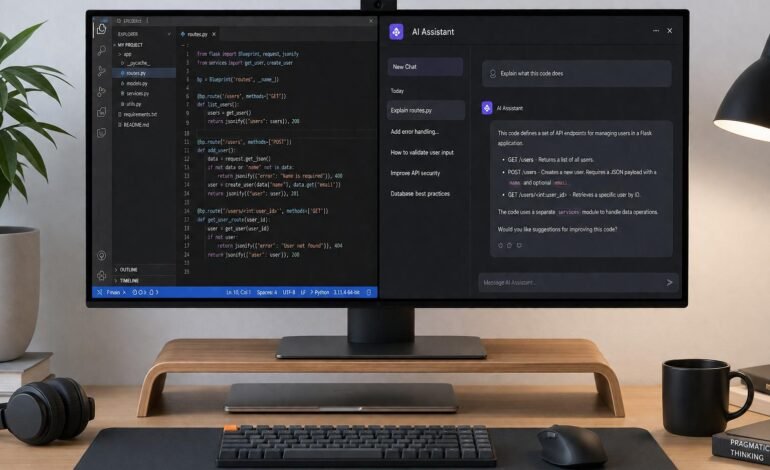
If you are still awkwardly copy-pasting text between browser tabs to get your AI to do its job, you are stuck in 2024.
As we hit the second half of 2026, the landscape has fundamentally shifted. We have moved past the era of the generic chatbot. The best AI tools today are specialized, agentic, and deeply embedded into the places where we actually do our work. They don’t just generate text; they execute multi-step workflows, debug massive codebases, and maintain strict brand voices.
As someone who tests early-access software for a living, I’ve spent the last six months stress-testing the current market. Here is a definitive, hype-free guide to the AI tools actually worth your subscription money in July 2026.
Key Takeaways
-
Coding is the killer app: AI-native IDEs like Cursor have officially outpaced standard autocomplete extensions.
-
Reasoning beats speed: The new generation of models (OpenAI’s o3, Claude 4.6) actually “think” before responding, reducing errors in complex tasks.
-
Video generation is ready for production: Tools like Veo and Sora 2 are now capable of maintaining character consistency and realistic physics.
-
Ecosystems matter: Standalone wrappers are dying. The winners are platforms that integrate directly with your existing data (like Google Workspace or GitHub).
Top AI Tools Comparison (July 2026)
| Tool | Best For | Standout Feature | Starting Price (USD) |
| ChatGPT (o3) | Complex logic & general use | Deep reasoning model | $20/mo (Plus) |
| Claude | Long-form writing & analysis | Massive context window | $20/mo (Pro) |
| Gemini 3.1 Pro | Web research & ecosystem | 24/7 Spark Agent, Image Editing | $19.99/mo (Advanced) |
| Cursor | Software development | Multi-file agentic editing | $20/mo (Pro) |
| Perplexity | Factual research | Real-time cited sources | $20/mo (Pro) |
| Veo | Cinematic video generation | Flawless camera physics | $19.99/mo |
Best AI Tools for Writing and Thinking
The text generation war is no longer about who can write a decent email. It is about context, nuance, and logic.
1. ChatGPT (OpenAI)
ChatGPT remains the default choice for a reason: it ships the newest capabilities first. The recent integration of the o3 reasoning model is a massive leap forward. Instead of instantly spitting out the most statistically likely next word, it pauses to “think,” mapping out logical steps before generating an answer.
Pros:
-
Unmatched at complex logic, math, and multi-step problem solving.
-
Excellent multimodal capabilities (voice, vision, data analysis).
Cons:
-
Writing style can still lean toward being overly formal or robotic if not strictly prompted.
2. Claude (Anthropic)
If ChatGPT is your brutally efficient problem solver, Claude is your thoughtful editor. Powered by their latest architecture, Claude handles massive documents better than anyone else. You can drop a 500-page PDF or a dense financial report into Claude, and it won’t just summarize it—it will find the needle in the haystack.
Pros:
-
The most natural, human-sounding writing voice out of the box.
-
Incredible recall over massive context windows.
Cons:
-
Slower execution on basic tasks compared to lighter models.
3. Gemini 3.1 Pro
Google’s premium model, Gemini 3.1 Pro, is the undisputed king of ecosystem integration. If you are operating on the Paid tier (AI Premium), you unlock extended conversation lengths and complex reasoning. But the real standout is what came out of I/O 2026: Gemini Spark, which acts as an always-on personal agent, and the new Gemini Omni features for seamless video remixing.
For web and design tasks, Gemini’s built-in image editing is unmatched. You can highlight a specific part of an uploaded photo, draw directly on it to guide the prompt, and replace backgrounds while maintaining perfect character consistency.
Pros:
-
Native access to your Gmail, Drive, and YouTube data.
-
Best-in-class local image editing and seamless blending.
Cons:
-
The free tier (Flash) is fast but occasionally misses nuance on complex technical queries.
Best AI Tools for Coding
This is where productivity gains are objectively measurable. The debate between “AI will replace developers” and “AI is a gimmick” has settled into a comfortable reality: AI tools are now mandatory for developers who want to stay competitive.
1. Cursor
Cursor isn’t just an extension; it is an AI-native fork of VS Code. While older tools like GitHub Copilot simply auto-complete your next few lines, Cursor’s Composer mode operates like a junior developer. You can ask it to “refactor the authentication flow to use OAuth2,” and it will autonomously edit multiple files, update dependencies, and run terminal commands.
Pros:
-
Agentic workflow that edits across your entire codebase simultaneously.
-
Lets you choose the underlying model (Claude, GPT-4o, etc.) per task.
Cons:
-
Requires you to abandon your current IDE setup to fully migrate.
2. GitHub Copilot
For enterprise teams or developers unwilling to switch away from JetBrains or native VS Code, Copilot remains the industry standard. It is less aggressive than Cursor, functioning more as a brilliant pair programmer that anticipates your next move.
Pros:
-
Works seamlessly inside your existing editor.
- Enterprise tier includes crucial IP indemnification.
Cons:
-
Lacks the autonomous, multi-file refactoring power of AI-native IDEs.
Examples in the Wild
Expert Insight: “I use Copilot for the micro-moments—the inline autocomplete that saves me 15 seconds here and there. But on Fridays, when I need to migrate an entire legacy database schema, I fire up Cursor, explain the architecture, and let it draft the 40 file changes while I review the diffs.” — Senior Cloud Architect, TechFlow.
Best AI Tools for Design and Productivity
Perplexity AI
Search is fundamentally broken, and Perplexity is fixing it. Instead of giving you a list of SEO-optimized blue links, it reads the links, synthesizes the information, and gives you a direct answer with inline citations. For July 2026, it is the only tool I use for factual, time-sensitive research.
Veo & Sora 2
The video generation market has matured rapidly. Google’s Veo (which handles cinematic, physics-accurate motion beautifully) and OpenAI’s Sora 2 are no longer just producing trippy, distorted clips. They are being used by marketing teams to generate B-roll, product teasers, and storyboards at a fraction of traditional production costs.
FAQs
Q. Are paid AI tools worth the subscription in 2026?
Yes. While free tiers (like Gemini Flash or basic ChatGPT) are great for casual queries, the paid tiers unlock the reasoning models, massive context windows, and agentic workflows where the actual ROI lives. If a $20/month tool saves you one hour of work a week, it has paid for itself.
Q. What is the difference between an AI chatbot and an AI agent?
A chatbot waits for your prompt, generates text, and stops. An agent (like Cursor or Gemini Spark) can plan a sequence of actions, execute them across different files or apps, check its own work for errors, and iterate until the task is complete.
Q. Can AI tools replace my primary search engine?
For research and factual queries, tools like Perplexity are vastly superior to traditional search. However, traditional search engines are still necessary for navigational queries (e.g., finding a specific login page or local business hours).
Conclusion
The “AI tourist” phase is over. The best AI tools of July 2026 aren’t designed to be played with; they are designed to be worked with.
If you write heavily, invest in Claude. If you code, download Cursor today. If you live in spreadsheets and docs, and need a unified workspace assistant, upgrade to Gemini Advanced. Stop trying to use one tool for everything, and start building a specialized stack that actually respects your time.