The Real AI Productivity Stack: Tools That Actually Cut Work Hours, Not Add to Them


Two years into the generative software boom, the corporate world hit an unexpected wall: tool fatigue. Almost every software vendor slapped a chatbot into their sidebars, promised a 10x multiplier on human output, and invoiced enterprise clients accordingly.
The reality on the ground was messier. Workers found themselves spending twenty minutes babysitting a prompt to draft a two-minute email, or combing through hallucinated footnotes in automated slide decks. That isn’t productivity; it’s unpaid quality assurance for beta software.
True productivity isn’t about novelty. It boils down to eliminating low-leverage friction: context-switching, raw transcription, cross-referencing messy documentation, drafting routine code, and wrestling with fragmented knowledge bases.
A handful of applications have crossed the threshold from interesting parlor tricks to indispensable utilities. If you want to strip the noise from your workday and build an operating system that frees up hours rather than minutes, here are the must-have AI tools for productivity worth your subscription dollars.
The Shift From Conversational Chatbots to Context-Aware Engines
Early AI adoption revolved around single-turn prompts: asking a chatbot to summarize an article or generate a draft from scratch. While helpful, that paradigm still required you to carry all the context across browser tabs.
The current generation of productivity software operates differently. These tools sit directly inside your existing file structures, pull context from your calendar and inbox without explicit prompting, and increasingly execute multi-step workflows autonomously.
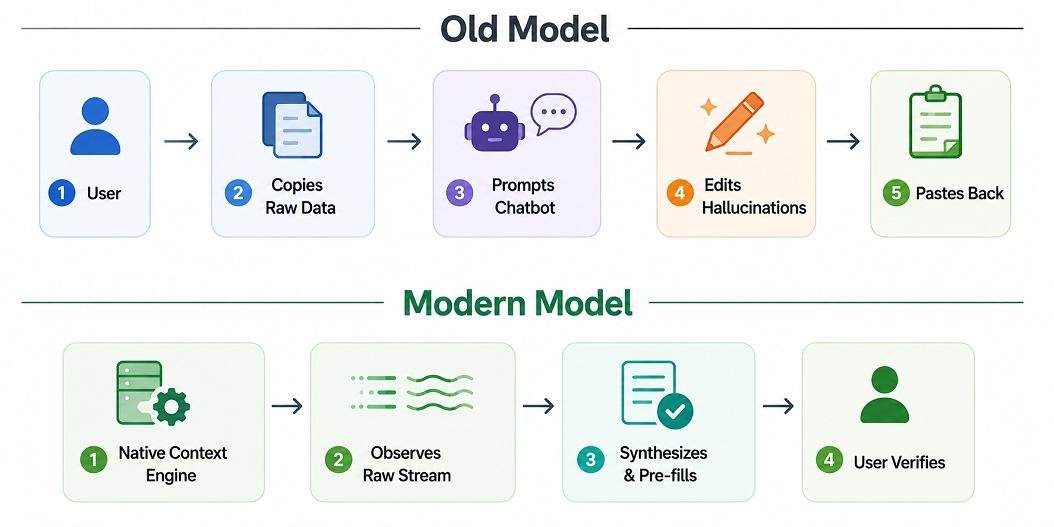
The difference between these approaches represents the gap between a novelty and an indispensable workflow tool.
1. Deep Research and Verification: Perplexity Pro
Traditional search engines have deteriorated under the weight of sponsored links, SEO spam farms, and fragmented forum boards. When you need clear, sourced market intelligence or technical answers, digging through blue links costs hours.
Perplexity bypasses search pagination by querying indices in parallel, synthesizing coherent answers, and citing every claim with inline academic, journalistic, or repository links.
Why It Replaces Standard Search
-
Deep Research Modes: Its multi-step query planner executes dozens of recursive web queries, parses PDFs, cross-checks contradictory reporting, and outputs structured intelligence briefings.
-
Collections and Sourcing: You can upload internal documents (financial reports, API documentation) and force the model to ground its research strictly against your provided sources.
-
Zero Ad Clutter: Strips out affiliate clickbait, delivering clean answers with verifiable source breadcrumbs.
Field Note: If you find yourself opening six browser tabs to compare software licenses, legal precedents, or regulatory filings, Perplexity cuts that cycle by roughly 75%. Treat it not as a search engine, but as an entry-level research analyst that reads at machine speed.
2. Dynamic Knowledge Hubs: Notion AI
Knowledge workers lose an estimated 3.6 hours a week just hunting for internal company documentation across Slack channels, Google Drive folders, and buried email chains. Notion solved the storage problem years ago, but its integration of workspace-native machine intelligence solved the retrieval problem.
Rather than acting as a standalone writing assistant, Notion AI indexes every workspace database, project roadmap, and team wiki to act as an internal knowledge graph.
Core Strengths
-
Q&A Across Workspaces: You can ask, “What was our agreed refund policy for the Q2 enterprise pilot?” and the system pulls the exact clause from a buried product requirements doc.
-
Automated Database Properties: Automatically populates summary columns, extracts action items from raw meeting notes, or assigns status tags across large document sets.
-
Contextual First-Draft Generation: Generates briefs, spec sheets, and updates using your company’s historical documentation as reference material.
3. The Coding Accelerator: Cursor
Software development was among the first professions upended by generative tools, but early plugins suffered from an annoying flaw: they could only see the file you were actively working in. They had no idea that changing a schema on line 42 would break your API endpoints three directories away.
Cursor, built as an intelligent fork of VS Code, shifted the baseline by indexing the entire repository.
| Metric | Traditional Autocomplete | Cursor (Full-Codebase Context) |
| Context Horizon | Active file only | Full codebase vector index + git history |
| Refactoring Capability | Single-function rewrites | Multi-file structural migrations |
| Bug Diagnosis | Syntax correction | Terminal error trace cross-referencing |
| Learning Curve | Zero | Low (identical to VS Code interface) |
Practical Impact
With native terminal integration, Cursor reads your compiler errors directly. When an installation fails, or a migration throws an obscure dependency warning, the editor explains the breakdown and drafts the patch across multiple files simultaneously. It does not replace the senior engineer’s architectural judgment; it removes the mechanical typing and boilerplate work.
4. Invisible Meeting Intelligence: Granola
Meeting recording bots that jump into your Google Meet or Zoom calls as an awkward extra participant have become a modern corporate headache. They make participants self-conscious, clutter the call screen, and spit out 10-page transcripts that nobody ever reads.
Granola takes an entirely different, human-first approach. It runs locally on your machine, captures internal audio alongside your microphone, and pairs with your own shorthand notes.
How It Redefines Meeting Retention
-
No Intrusive Bot: It lives in your menu bar. There is no automated avatar sitting in your client meetings asking for recording permissions.
-
Enhances Your Intent: If you type three words during a client call—“Pricing pushback: Tier 2”—Granola listens to what was said during that exact minute and expands your brief thought into an articulate, context-rich summary.
-
Action Item Extraction: Categorizes follow-ups into assigned owners and sends them straight to your task manager or CRM.
5. High-Cognition Synthesis: Claude (with Projects and Artifacts)
When work moves past simple summaries into structural synthesis—rewriting complex legal contracts, analyzing nuanced strategic proposals, or processing messy raw data—Anthropic’s Claude remains the front-runner.
The platform’s Artifacts UI decouples conversational dialogue from document generation. Rather than trapping generated text, diagrams, or code inside an endless scrolling chat transcript, Claude renders them in a dedicated, live-editable side panel.
High-Leverage Scenarios
-
Massive Token Windows: Process complete technical manuals, 200-page regulatory filings, or full code libraries in a single prompt without context degradation.
-
Project Knowledge Bases: Set up custom workspaces equipped with brand voice guidelines, style books, and system schemas so the model never requires ground-up calibration.
-
Real-Time Prototyping: Generates working interactive prototypes, SVG diagrams, and financial models that can be tested directly on the screen.
The AI Productivity Stack at a Glance
| Category | Tool | Best Used For | Primary Advantage |
| Research & Fact Retrieval | Perplexity Pro | Market analysis, source verification | Eliminates SEO clutter with direct, verifiable citations |
| Knowledge Management | Notion AI | Centralizing team wikis, project docs | Unified search across your entire workspace history |
| Software Development | Cursor | Rapid prototyping, code maintenance | Contextual awareness of your full local repository |
| Meeting Intelligence | Granola | Executive briefings, client notes | Non-intrusive local capture blended with typed notes |
| Deep Thinking & Writing | Claude | Long-form analysis, document drafts | Unmatched nuance and side-by-side interactive workspaces |
| Workflow Automation | Make / Zapier Central | Cross-app data routing | Connects siloed SaaS products without custom code |
The Hidden Pitfalls: Navigating the “AI Tax”
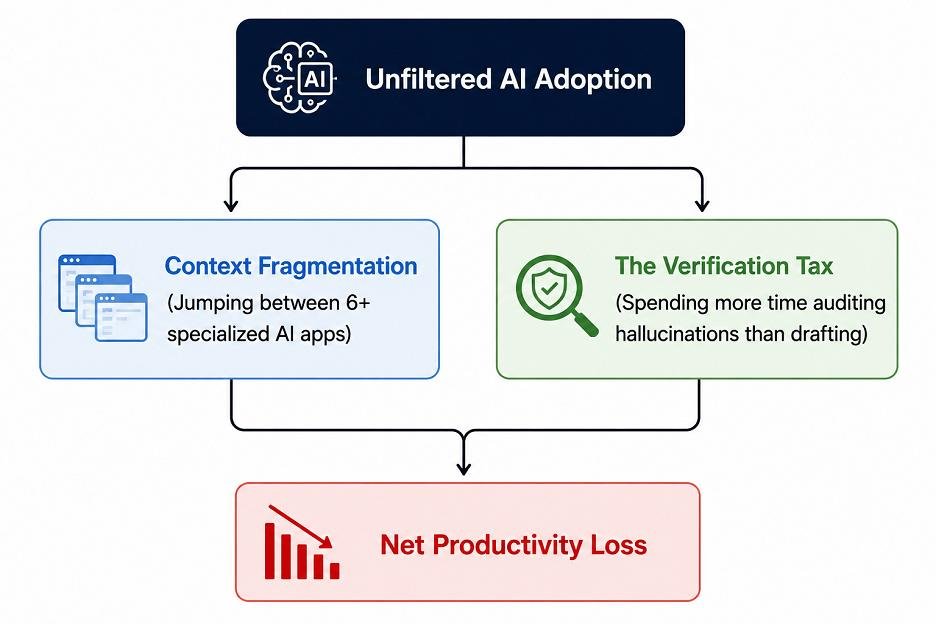
Adopting these tools without strict workflow guardrails can actually reduce personal efficiency. Understanding the structural risks is critical for any team building out their software stack.
1. The Verification Tax
Every time an AI model generates four paragraphs of content, a human must read, verify, and sanity-check every claim. If an engine drafts a market projection in 10 seconds, but you need 25 minutes to verify its statistical references, you haven’t saved time. Stick to tools that cite verifiable source paths or run deterministic code.
2. Context Fragmentation
The easiest way to kill focus is running six different specialized AI tools at once. When your meeting notes live in one platform, your tasks in another, your code editor has its own system, and your web research sits in a fourth browser window, the cognitive overhead of stitching them together degrades performance. Pick a core stack of three interoperable platforms and master their advanced integrations.
3. Data Privacy and Training Leaks
Inputting proprietary source code, confidential financial numbers, or customer records into consumer-tier AI products presents serious security risks. Always ensure your team is using business or enterprise tiers that explicitly guarantee zero data retention for public model training.
How to Build Your Daily AI Workflow: A Realistic Framework
Do not overhaul your entire daily schedule overnight. Instead, systematically swap out high-friction, low-cognitive tasks using this progressive three-phase framework.
Phase 1: Clean Up Information Capture (Week 1–2)
Begin by automating raw intake.
-
Replace manual meeting notes with an unobtrusive intelligence tool like Granola.
-
Swap standard consumer search queries for sourced research engines when compiling market reports or tracking technical specs.
-
Goal: Reclaim 3–5 hours previously spent writing recap emails and sorting search engine links.
Phase 2: Consolidate Your Knowledge Base (Week 3–4)
Move your internal knowledge repository into a platform that handles contextual retrieval.
-
Index your internal manuals, standard operating procedures, and product specs within Notion or Claude Projects.
-
Train your team to query internal documentation with semantic questions before sending direct messages to busy colleagues.
-
Goal: Cut down internal interruptions and duplicate documentation work.
Phase 3: Automate Cross-App Plumbing (Month 2 and Beyond)
Build background connections between your communication channels and project boards.
-
Use tools like Make or Zapier to listen for incoming client requests, run them through an extraction model, format the data, and pre-populate draft deliverables in your project manager.
-
Maintain human sign-off as a mandatory checkpoint before anything leaves your desk.
-
Goal: Eradicate manual data entry between your operational software tools.
The Verdict: Quality Over Quantity
The generative AI market will continue releasing hundreds of single-feature apps every month. Most are wrappers designed to capture short-term venture capital before folding into foundational operating systems.
The professionals seeing measurable, double-digit improvements in output are not those testing every new tool on the market. They are the operators who pick a tight, disciplined stack, ruthlessly filter out software gimmicks, and use automated intelligence for what it does best: handling mechanical overhead so human expertise can focus on critical thinking, strategy, and execution.